
Server Clock and Daily Reset Hour is a small read-only chart panel that answers one question: what hour, in your broker's server time, does your trading day actually reset?
Prop firm and funded account rules are usually written in a time zone that is not yours and not your broker's. A rule that says the day resets at 5:00 pm New York has to be converted into broker server time before it is any use to you, and the answer changes twice a year when clocks shift for daylight saving. Getting it wrong means every daily loss figure you track is measured from the wrong starting point.
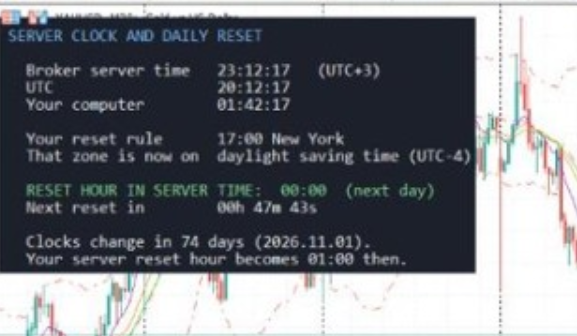
Server Clock and Daily Reset Hour panel on a chart
What the panel shows
Broker server time, updated every second, with the server's offset from UTC detected automatically
Current UTC time and your own computer's time, side by side, so the three clocks can be compared at a glance
Your firm's reset rule as you entered it, and the time zone it is written in
Whether that zone is currently on standard time or daylight saving time
The reset hour converted into broker server time
A live countdown to the next reset
A warning in advance of the next daylight-saving change, and what the reset hour becomes once it happens
Inputs
ResetZone — the time zone your firm's rule is written in (New York, Chicago, London, Frankfurt, UTC, or a custom fixed offset)
ResetHour / ResetMinute — the reset hour and minute in that zone, as your firm states it (for example 17:00)
CustomZoneOffsetMinutes — only used when ResetZone is set to Custom
AutoDetectServerOffset — works out the broker server's UTC offset automatically (recommended, on by default)
ManualServerOffsetMinutes — used only if auto-detect is switched off
Panel position, font size and colour inputs for display only
Why this exists
Prop firm and funded accounts live and die by the daily reset boundary. This tool solves one recurring piece of confusion: converting a firm's reset rule into the time your terminal actually runs on, and catching the twice-a-year daylight-saving shift before it catches you.
Technical details
Sends no orders. Reads no account, order or position data. Display only. Works on any symbol and any timeframe. Platform: MetaTrader 5.
Server Clock and Daily Reset Hour - expert for MetaTrader 5
넘버원 트레이더2026-08-27 01:41 72 0
과거 성과는 미래 수익을 보장하지 않습니다. 레버리지 상품 거래는 원금 전액 손실 위험을 수반합니다.